
Transformers: NLP Applications
Chadi Helwe, PhD
CSC 464: Deep Learning for Natural
Language Processing
Introduction
Transformers: NLP Applications
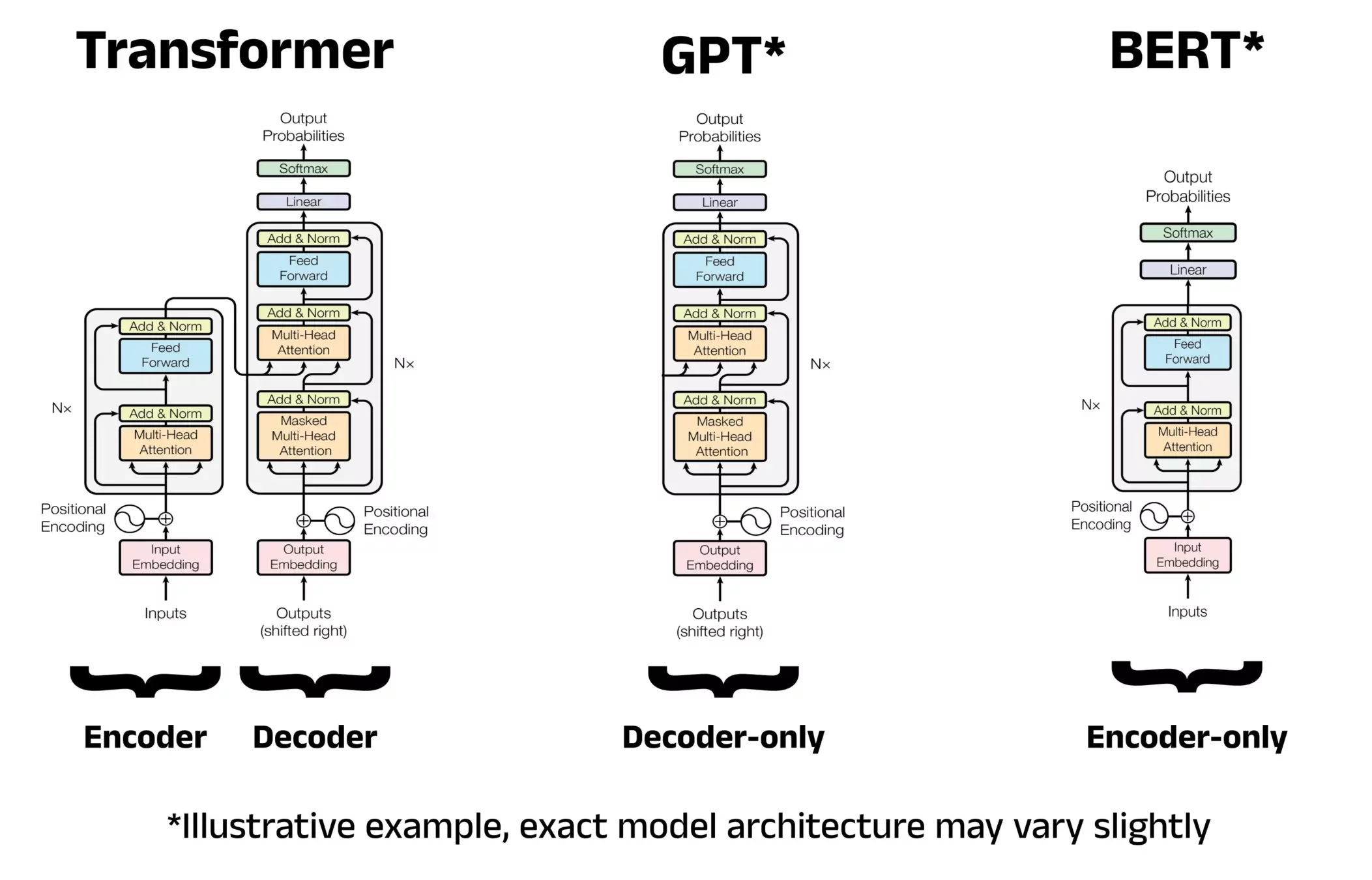
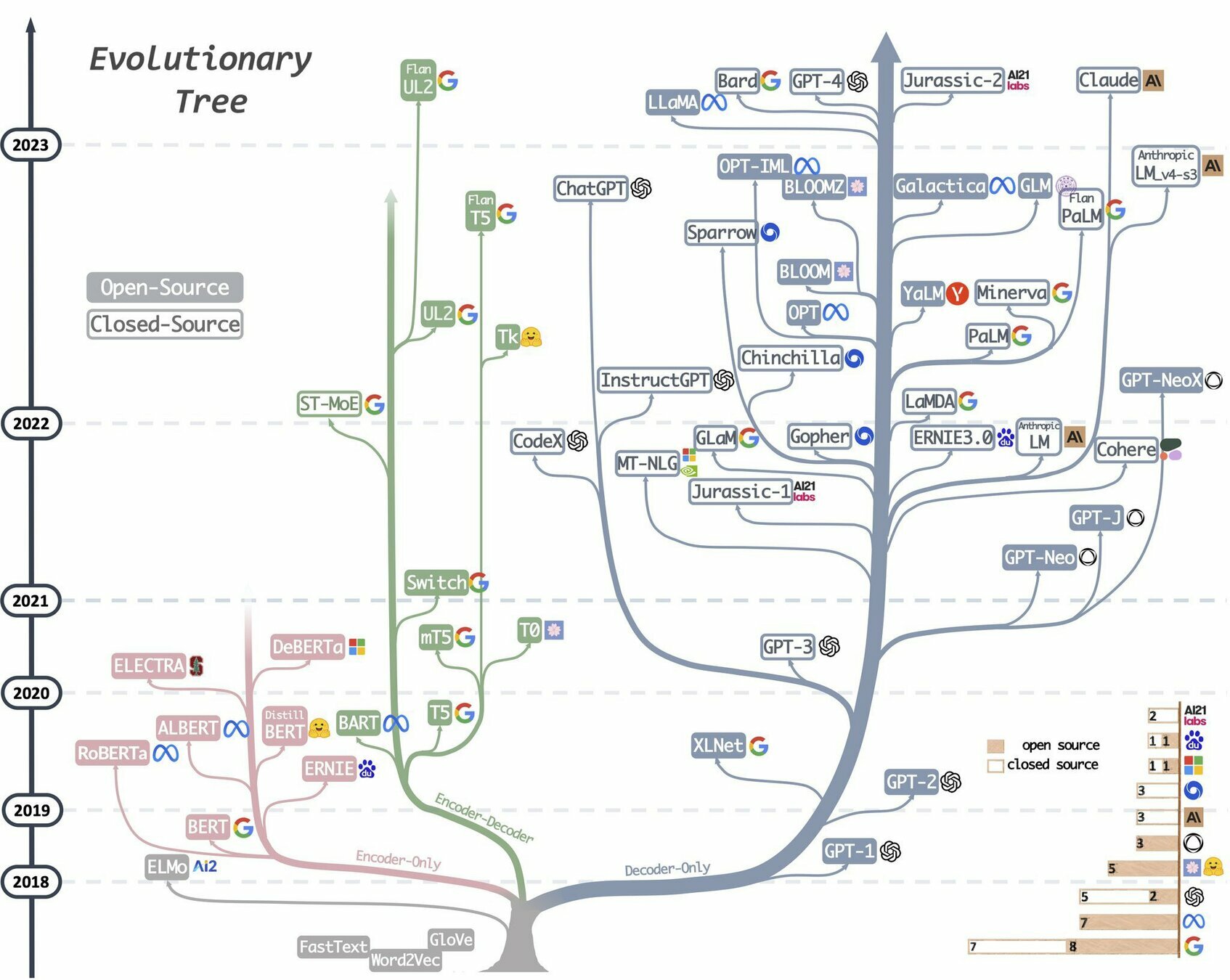
Transformers Architectures (1/3)
Encoder Only: BERT
-
Learns contextual representations.
-
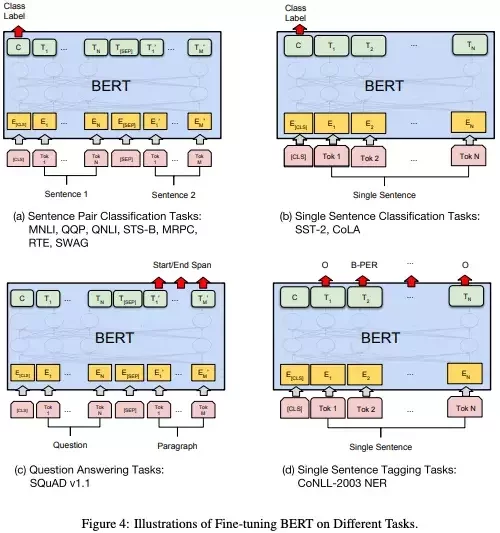
Best for classification tasks (sentiment analysis, QA).
Encoder-Decoder (e.g., T5, BART, original Transformer)
-
Encoder reads input → Decoder generates output.
-
Best for sequence-to-sequence tasks (translation, summarization).
Decoder-only (e.g., GPT)
-
Generates text autoregressively (one token at a time, with masking).
-
Best for generation tasks (chat, story, code).
Transformers: NLP Applications
Transformers Architectures (2/3)
Transformers: NLP Applications
Transformers Architectures (3/3)
Bidirectional Encoder Representations from Transformers (BERT)
Transformers: NLP Applications
Meet BERT
BERT = Bidirectional Encoder Representations from Transformers (Google, 2018).
Pretrained on massive text corpora (BooksCorpus + Wikipedia).
Architecture: encoder-only.
Key strength: bidirectional context (sees left + right).
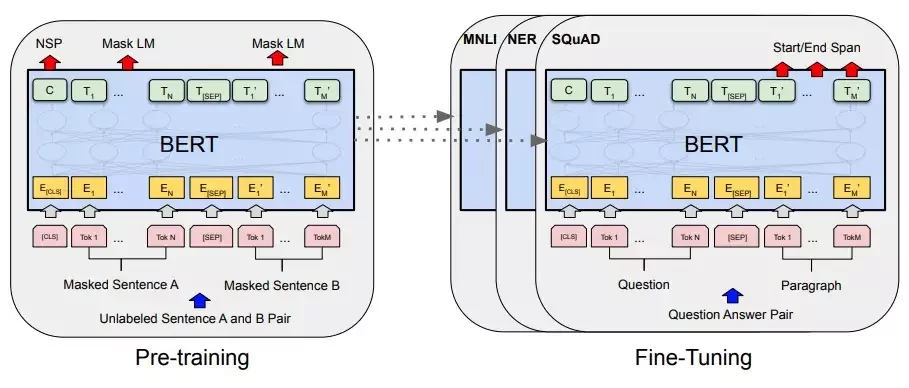
Pre-Training objective:
-
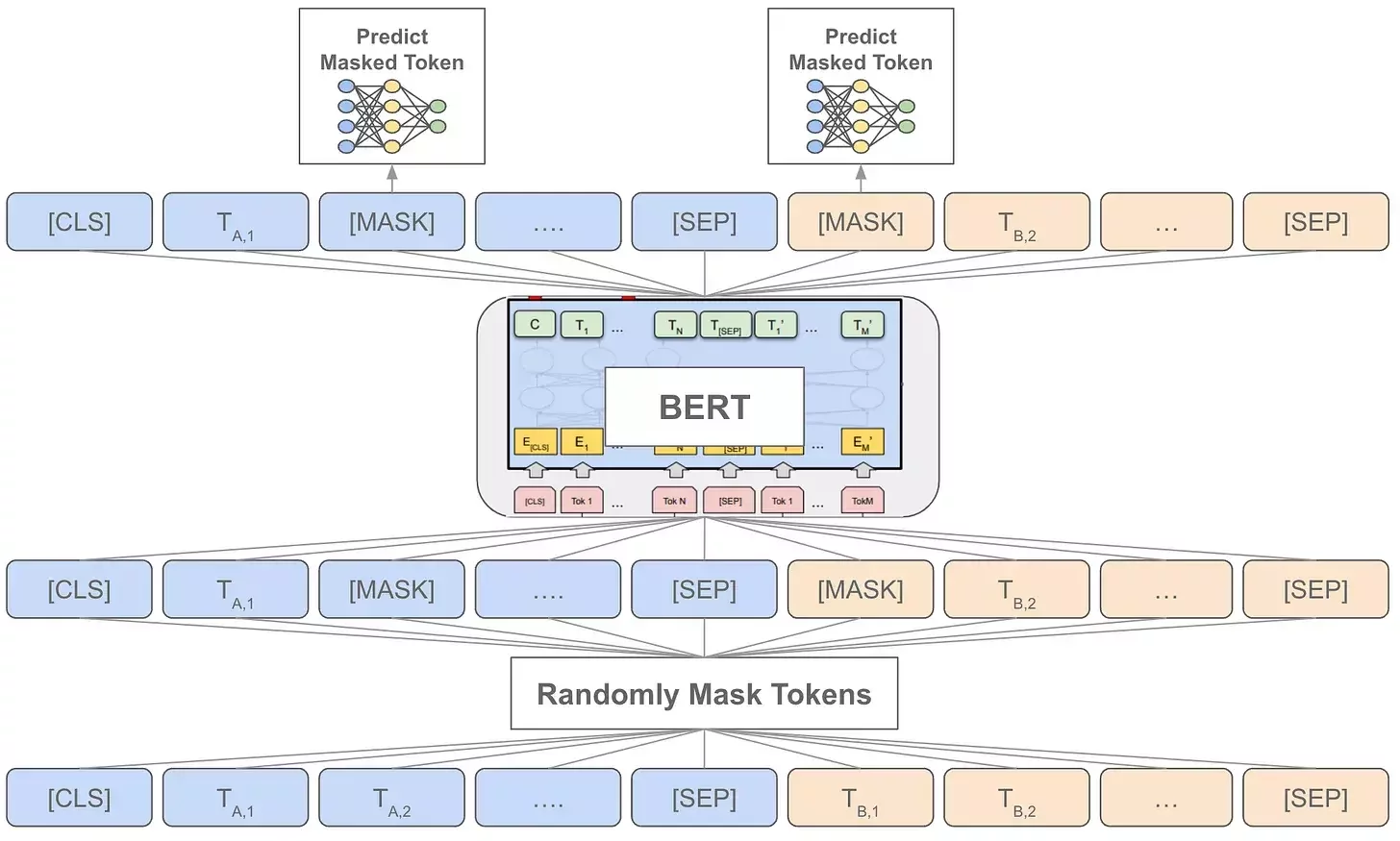
Masked Language Modeling (MLM): predict masked words.
-
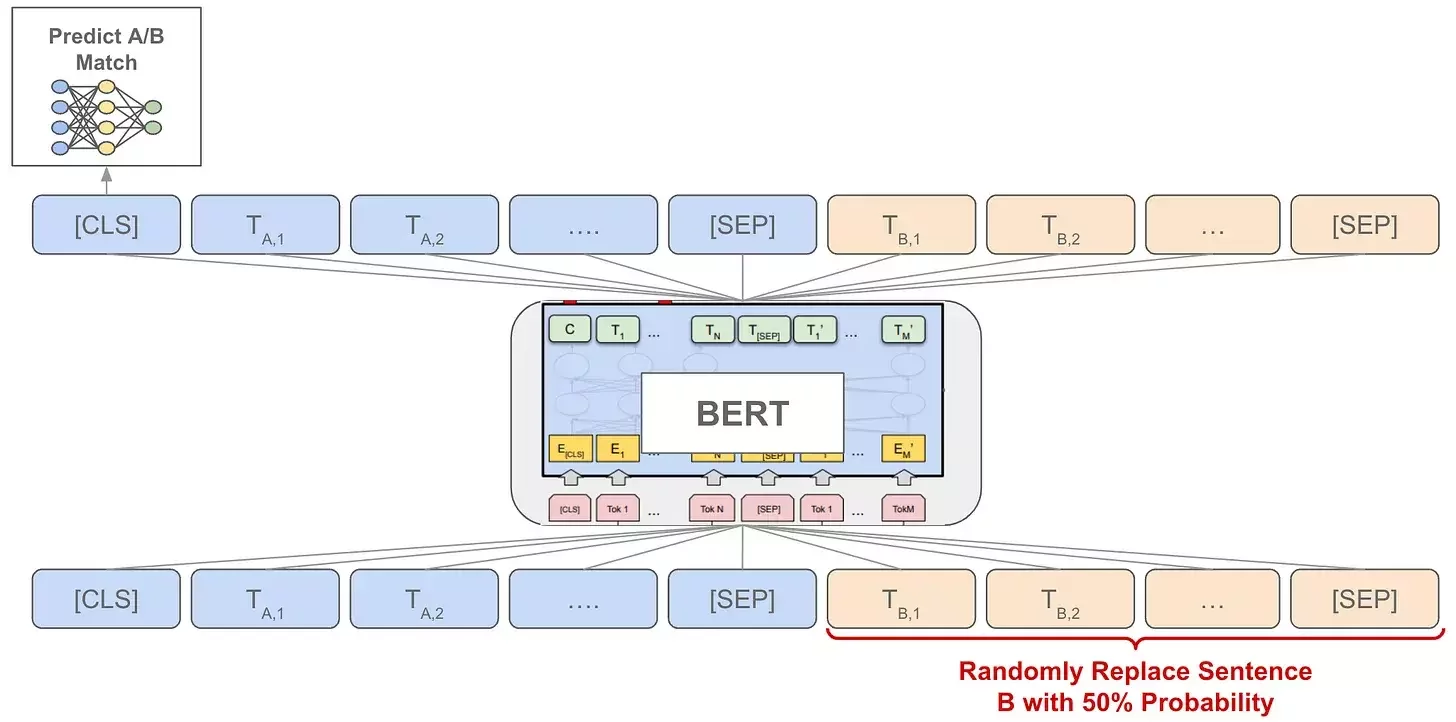
Next Sentence Prediction (NSP): learn sentence relationships.
Transformers: NLP Applications
Training Process of BERT
Transformers: NLP Applications
Masked Language Modeling (MLM)
Transformers: NLP Applications
Next Sentence Prediction (NSP)
Transformers: NLP Applications
Finetuning with BERT
Text Classification
Transformers: NLP Applications
What is Text Classification?
A model automatically categorizes or labels text, transforming unstructured text into actionable insights.
Common Tasks:
-
Sentiment analysis → Positive / Negative (reviews, social media).
-
Spam detection → Spam / Not Spam (emails, SMS).
-
Topic categorization → Sports, Politics, Tech, etc.
-
Intent detection → Customer queries (“order status”, “refund”).
Transformers: NLP Applications
Worflow Overview
The workflow for training a model on a text classification task:
-
Load dataset.
-
Preprocess (tokenize text).
-
Choose a pre-trained model (e.g., BERT).
-
Fine-tune on your dataset.
-
Evaluate (accuracy, F1).
-
Make predictions
Transformers: NLP Applications
Dataset Examples
We have different datasets available for text classification purposes:
-
IMDb → Movie reviews labeled as Positive / Negative (sentiment).
-
SMS Spam Collection → Messages labeled as Spam / Ham.
-
AG News → News articles labeled into World / Sports / Business / Sci-Tech.
-
Amazon Reviews → Reviews labeled from 1 to 5 stars (sentiment + rating).
-
Yelp Reviews → Customer reviews labeled as Positive / Negative.
Transformers: NLP Applications
Libraries you Need
Install core libraries:
-
transformers → Access to pre-trained models (BERT, GPT, DistilBERT) and their tokenizers (turn text into model-ready inputs).
-
datasets → Load and manage benchmark datasets (IMDb, AG News, SMS Spam),
-
torch (PyTorch) → Deep learning framework used to train and run models.
-
scikit-learn → Tools for evaluation metrics (accuracy, precision, recall, F1) and confusion matrices.
pip install transformers datasets torch scikit-learn
Transformers: NLP Applications
Loading Dataset
Use 🤗 Datasets to fetch ready-to-use data.
from datasets import load_dataset
dataset = load_dataset("imdb")
print(dataset)
print(dataset["train"][0])
Splits: train, test. Labels = 0 (neg), 1 (pos).
Output:
{'text': 'This movie was fantastic!', 'label': 1}Transformers: NLP Applications
Tokenization
Convert text into tokens for the model.
from transformers import BertTokenizer

tokenizer = BertTokenizer.from_pretrained("bert-base-uncased")

tokens = tokenizer("The movie was fantastic!",
                   padding="max_length",
                   truncation=True,
                   return_tensors="pt")


tokenized_datasets = dataset.map(tokenize_function, batched=True)

tokenized_datasets = tokenized_datasets.remove_columns(["text"])
Transformers: NLP Applications
Choosing a Model
Use pre-trained Transformers (finetune them).
Common models used for text classification tasks typically fall under the category of encoder-only models, such as:
- BERT.
- DistilBERT (lighter, faster).
from transformers import BertForSequenceClassification

model = BertForSequenceClassification.from_pretrained(
    "bert-base-uncased", num_labels=2
)
Transformers: NLP Applications
Evaluation Metric
We measure model quality with:
-
Accuracy → overall % of correct predictions.
-
Precision → % of predicted positives that are correct.
-
Recall → % of actual positives correctly identified.
-
F1 Score → balances precision & recall.
from sklearn.metrics import accuracy_score, precision_recall_fscore_support

def compute_metrics(pred):
    labels = pred.label_ids
    preds = pred.predictions.argmax(-1)
    precision, recall, f1, _ = precision_recall_fscore_support(labels, preds, average='weighted')
    acc = accuracy_score(labels, preds)
    return {"accuracy": acc, "f1": f1, "precision": precision, "recall": recall}
Transformers: NLP Applications
Training the Model
Fine-tune on your dataset.
from transformers import Trainer, TrainingArguments

training_args = TrainingArguments(
    output_dir="./results",
    eval_strategy="steps",
    per_device_train_batch_size=16,
    num_train_epochs=3
)

trainer = Trainer(
    model=model,
    args=training_args,
    train_dataset=tokenized_datasets["train"],
    eval_dataset=tokenized_datasets["test"],
    compute_metrics=compute_metrics
)

trainer.train()
Transformers: NLP Applications
Evaluating Performance
Check how well the model does.
Metrics: Accuracy, Precision, Recall, F1.
It is important for imbalanced datasets (e.g., spam).
trainer.evaluate()
Transformers: NLP Applications
Making Predictions
Use the model on a new text.
text = "I loved this movie!"

inputs = tokenizer(text, return_tensors="pt")
outputs = model(**inputs)

prediction = outputs.logits.argmax().item()

print("Positive" if prediction == 1 else "Negative")
Machine Translation
Transformers: NLP Applications
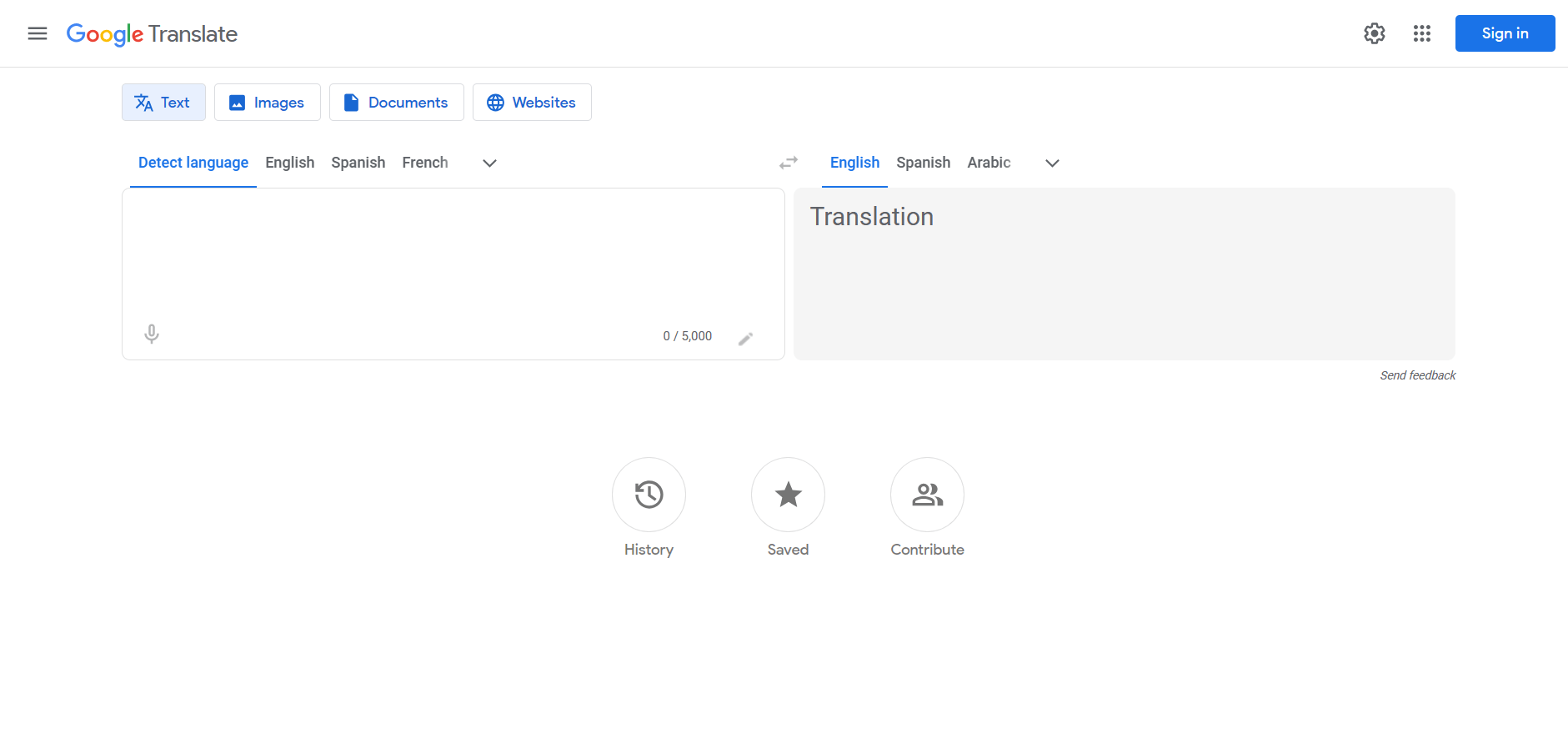
What is Machine Translation?
A model that automatically translates text from one language to another.
Example:
- English (Source): The cat is sleeping
-
French (Target): Le chat dort.
Transformers: NLP Applications
Why Encoder-Decoder Models?
Encoder: reads and understands the input sentence.
Decoder: generates the translated sentence step by step.
It is also referred to as sequence-to-sequence models (Seq2Seq).
Example:
-
T5 (Text-to-Text Transfer Transformer).
-
BART.
Transformers: NLP Applications
Workflow Overview
The workflow for training a model on a machine translation task:
-
Load dataset.
-
Preprocess (tokenize text).
-
Choose a se2seq pre-trained model (e.g., T5).
-
Fine-tune on your dataset.
-
Evaluate (BLEU).
-
Make predictions
Transformers: NLP Applications
Libraries you Need
Install core libraries:
-
transformers → Access to pre-trained models (BERT, GPT, DistilBERT) and their tokenizers (turn text into model-ready inputs).
-
datasets → Load and manage benchmark datasets (IMDb, AG News, SMS Spam),
-
torch (PyTorch) → Deep learning framework used to train and run models.
pip install transformers datasets torch
Transformers: NLP Applications
Libraries you Need
Install core libraries:
-
transformers → Access to pre-trained models (BERT, GPT, DistilBERT) and their tokenizers (turn text into model-ready inputs).
-
datasets → Load and manage benchmark datasets (IMDb, AG News, SMS Spam),
-
torch (PyTorch) → Deep learning framework used to train and run models.
-
sentencepiece → A library that is required for T5.
pip install transformers datasets torch sentencepiece
Transformers: NLP Applications
Loading Dataset
Use 🤗 Datasets to fetch ready-to-use data.
from datasets import load_dataset
dataset = load_dataset("opus_books", "en-fr")

print(dataset["train"][0])
Splits: train.
Output:
{'translation': {'en': 'The cat is sleeping.', 'fr': 'Le chat dort.'}}
Transformers: NLP Applications
Tokenization
Prepare source (English) and target (French):
from transformers import T5Tokenizer

tokenizer = T5Tokenizer.from_pretrained("t5-small")

def preprocess(batch):
    inputs = [f"translate English to French: {text}" for text in examples["en"]]
    targets = examples["fr"]

    model_inputs = tokenizer(inputs, max_length=512, truncation=True, padding=True)

    # Setup the tokenizer for targets
    with tokenizer.as_target_tokenizer():
        labels = tokenizer(targets, max_length=512, truncation=True, padding=True)

    model_inputs["labels"] = labels["input_ids"]
    return model_inputs

tokenized = dataset["train"].map(preprocess, batched=True)
Transformers: NLP Applications
Choosing a Seq2Seq Model
Use a pre-trained T5 model to fine-tune it.
from transformers import T5ForConditionalGeneration

model = T5ForConditionalGeneration.from_pretrained("t5-small")
Transformers: NLP Applications
Training the Model
Finetune the model using your dataset.
from transformers import Trainer, TrainingArguments

training_args = TrainingArguments(
    output_dir="./results",
    eval_strategy="steps",
    per_device_train_batch_size=8,
    num_train_epochs=3
)

trainer = Trainer(
    model=model,
    args=training_args,
    train_dataset=tokenized,
)

trainer.train()
Transformers: NLP Applications
Evaluating Translation
Use the BLEU score.
from datasets import load_metric

def compute_metrics(eval_pred):
    predictions, labels = eval_pred
    decoded_preds = tokenizer.batch_decode(predictions, skip_special_tokens=True)

    labels = np.where(labels != -100, labels, tokenizer.pad_token_id)
    decoded_labels = tokenizer.batch_decode(labels, skip_special_tokens=True)

    if load_metric:
        try:
            bleu = load_metric("bleu")
            result = bleu.compute(predictions=decoded_preds,\
                                  references=[[label] for label in decoded_labels])
            return {"bleu": result["bleu"]}
        except:
            pass

    exact_matches = sum(1 for pred, ref in zip(decoded_preds, decoded_labels)\
                        if pred.strip() == ref.strip())
    accuracy = exact_matches / len(decoded_preds) if decoded_preds else 0
    return {"bleu": accuracy}
Transformers: NLP Applications
Making Predictions
Use the model to translate a new text.
test_input = "translate English to French: I love learning languages"
input_ids = tokenizer(test_input, return_tensors="pt").input_ids

with torch.no_grad():
    generated_ids = model.generate(
        input_ids,
        max_length=50,
        num_beams=2,
        early_stopping=True
     )
    generated_text = tokenizer.decode(generated_ids[0], skip_special_tokens=True)
print(f"   Translation test: '{test_input}' -> '{generated_text}'")
Text Generation
Transformers: NLP Applications
What is Text Generation?
A model that produces coherent text given a prompt.
Example:
-
Prompt: Once upon a time
-
Generated text: There was a young prince…
Applications:
-
Generating stories, poems,..
-
chatbots
-
Code completion
Transformers: NLP Applications
Why GPT (Decoder-only)?
Decoder-only = autoregressive (predict next token).
Model learns:
$$P(w_1, w_2, \dots, w_n) = \prod_{i=1}^{n} P(w_i \mid w_1, \dots, w_{i-1})$$
Famous models: GPT-2, GPT-3, GPT-4.
Predicting each token based on all previous ones
Transformers: NLP Applications
The workflow for training a model on a machine translation task:
-
Load a dataset.
-
Preprocess (tokenize text).
-
Choose a decoder-only pre-trained model (e.g., GPT).
-
Fine-tune on your dataset.
-
Evaluate (perplexity).
-
Generate text.
Worflow Overview
Transformers: NLP Applications
Install core libraries:
-
transformers → Access to pre-trained models (BERT, GPT, DistilBERT) and their tokenizers (turn text into model-ready inputs).
-
datasets → Load and manage benchmark datasets (IMDb, AG News, SMS Spam),
-
torch (PyTorch) → Deep learning framework used to train and run models.
pip install transformers datasets torch
Libraries you Need
Transformers: NLP Applications
Use 🤗 Datasets to fetch ready-to-use data.
from datasets import load_dataset
dataset = load_dataset("wikitext", "wikitext-2-raw-v1")

print(dataset["train"][0])
Splits: train, validation, and test.
Output:
{'text': 'The team was involved in a controversial loss to the Los Angeles Kings ,
 when the Staples Center clock appeared to freeze at 1 @.@ 8 seconds allowing the
 Kings time to score the tying goal , before winning in overtime .
 During the season Columbus managed only two winning streaks of three or more games .
 One of which came towards the end of the year helping the Blue Jackets finish with 65 points ,
 the third worst point total in franchise history.'}
Loading Dataset
Transformers: NLP Applications
Prepare text for GPT.
from transformers import AutoTokenizer

tokenizer = AutoTokenizer.from_pretrained("distilgpt2")
tokenizer.pad_token = tokenizer.eos_token

def tokenize(batch):
    return tokenizer(batch["text"], truncation=True)

tokenized = dataset.map(tokenize, batched=True, remove_columns=["text"])
Tokenization
Transformers: NLP Applications
Use a pre-trained DistilGPT model to speed up the fine-tuning training.
from transformers import AutoModelForCausalLM

model = AutoModelForCausalLM.from_pretrained("distilgpt2")
model.config.pad_token_id = tokenizer.pad_token_id
Choose a Decoder-Only Model
Transformers: NLP Applications
Finetune the model using your dataset.
from transformers import Trainer, TrainingArguments, DataCollatorForLanguageModeling

collator = DataCollatorForLanguageModeling(tokenizer=tokenizer, mlm=False)

args = TrainingArguments(
    output_dir="./results",
    eval_strategy="steps",
    per_device_train_batch_size=2,
    num_train_epochs=3
)

trainer = Trainer(
    model=model,
    args=args,
    data_collator=collator,
    train_dataset=tokenized["train"],
    eval_dataset=tokenized["validation"]
)

trainer.train()
Training the Model
Transformers: NLP Applications
Use perplexity as the metric.
import math

eval_results = trainer.evaluate()

print("Perplexity:", math.exp(eval_results["eval_loss"]))
Number of tokens
Probability the model assigns to the correct token
Evaluating the Model
Transformers: NLP Applications
Generating Text
Use the model to generate new text.
from transformers import pipeline

generator = pipeline("text-generation", model="distilgpt2")

prompt = "In a distant future,"
output = generator(prompt, max_length=50, temperature=0.8, top_p=0.9)

print(output[0]["generated_text"])
Control Style:
-
Temperature (t): rescales probabilities → lower t = focused, higher t = creative.
-
Top-k: sample only from top k most likely tokens (fixed set).
-
Top-p (nucleus): sample from smallest set of tokens covering probability p (adaptive).